
(For Project Leaders and OBM Substitutes)
If you need to update or enter quantities on behalf of country buyers, follow the steps below.
1. Disable Emails and Reminders (Recommended Before Editing)
If you want to avoid triggering automatic email notifications during the process, temporarily disable them. Skip this step if the grid is still Online.
How to disable emails
Navigate to: Project Management → Emails and Reminders → Inform/Remind → Select All Emails → Disable

2. Extend the Demand Specification Grid
Skip this step only if the grid status is already Online. If the grid is Closed or In Analysis, it must be extended before placing values.
How to extend the grid
Navigate to: Demand Specification → Back to Tender Elements → Extend

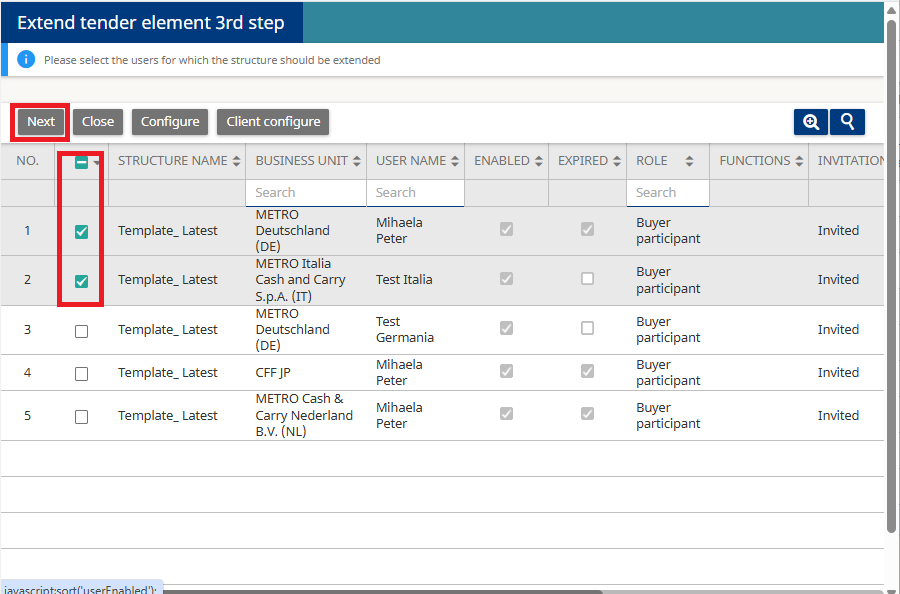
Select the countries for which you want to extend the grid.
Click Next.
- Enter the new deadline.
- Click Apply.

3. Place Values
Now you can enter or update quantities on behalf of the country buyer.
How to place values
Navigate to: Demand Specification → Back to Tender Elements → Place Values

- Select the country for which you are maintaining quantities.
- Enter the values manually, or use Export / Import if you need to maintain many lines.
- Click Save.
- Click Publish All Tabs.

The published values will now appear in View Answers.

4. Close the Demand Specification Grid
If you extended the grid only to make corrections, you should close it again afterward.
How to close
Navigate to: Demand Specification → Back to Tender Elements → Close

5. Re-enable Emails and Reminders
Once the updates are complete, turn notifications back on.
How to enable emails
Navigate to: Project Management → Emails and Reminders → Inform/Remind → Select All Emails → Enable

For any further questions do not hesitate to contact us.